Online privacy and security remain important concerns. While a VPN is not a complete cybersecurity solution, it can help protect your connection.
Do you need more reasons to start thinking about your internet security?
Certainly not!
Then it is high time to explore our KeepSolid VPN Unlimited review.
To begin with, like any other VPN provider, VPN Unlimited has its own pros and cons. Let’s see whether the provider is worth using in 2026 and how it compares to alternatives like ExpressVPN. We’ll cover features, privacy, pricing, and more.
VPN Unlimited’s plans and prices
Even though robust encryption and a clear privacy policy are important indicators of a trustworthy provider, cost matters a lot from a customer’s perspective. If a VPN service is overpriced, customers may prefer a cheaper alternative. There are many VPN services on the market, so it is worth comparing subscription lengths, device limits, and renewal terms before making a purchase.
KeepSolid VPN Unlimited advertises monthly, annual, and lifetime subscriptions. Its offers include:
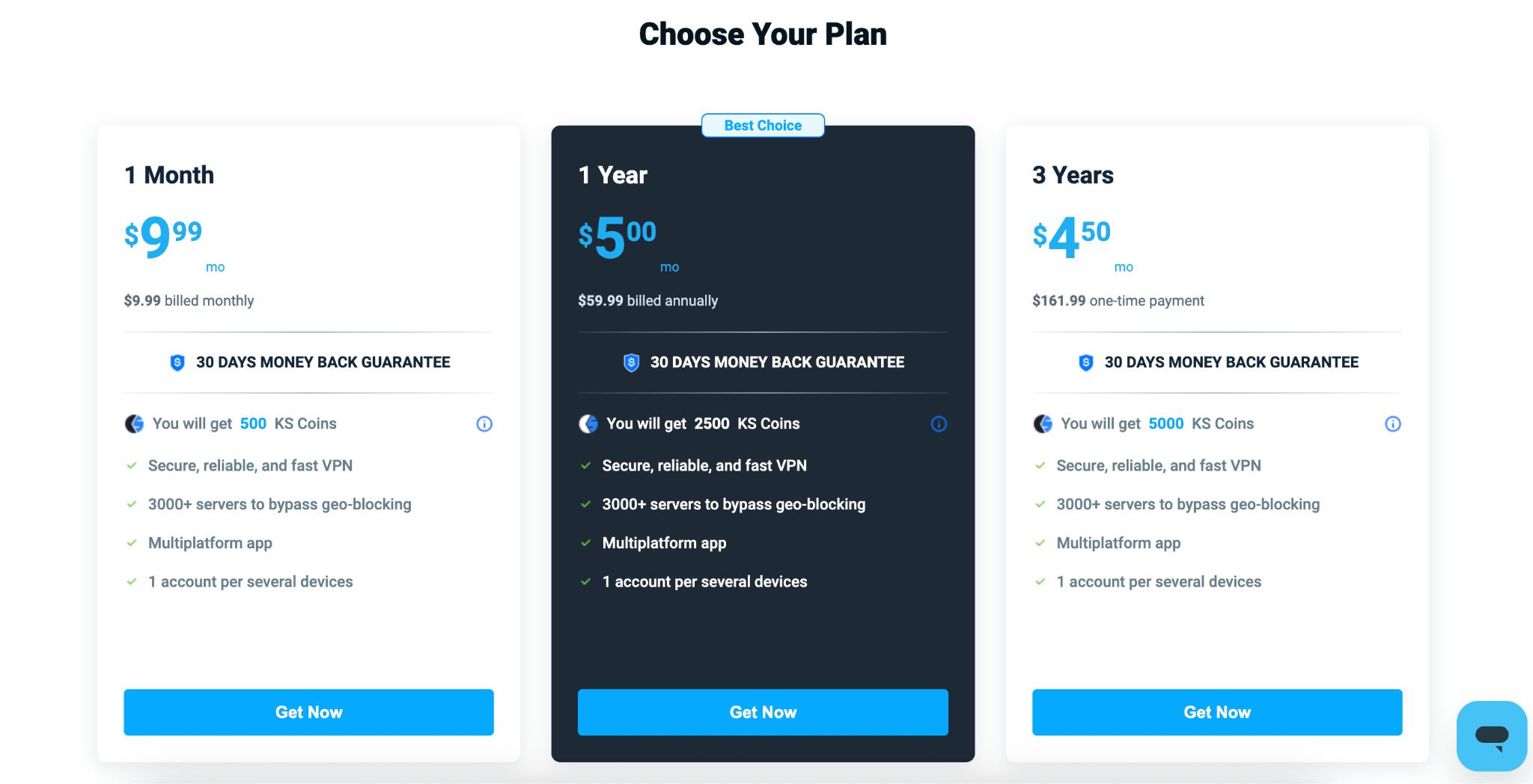
- 1-month package. If you are looking for temporary protection, you can opt for a $9.99 monthly subscription. This plan may suit those who need a VPN for a short trip abroad.
- 1-year package. Annual subscription at $59.99, equivalent to approximately $5.00 per month, billed annually. This may suit those who plan to use a VPN regularly.
- 3-year subscription. KeepSolid also offers a 3-year plan with a one-time payment of $161.99, bringing the monthly price down to $4.50.
VPN Unlimited offers a 30-day money-back guarantee, giving customers time to evaluate the service after purchasing a subscription.
VPN Unlimited supports several payment methods, including credit cards, PayPal, Bitcoin, and app-store purchases. The available options depend on where you purchase the subscription.
Server network
The size and distribution of a VPN’s server network are important. Servers in different locations give you more connection options, but the total number of servers alone does not guarantee better speeds. Your connection speed can depend on the distance to the selected server and its current workload. A nearby server is often a useful starting point when speed is your priority.
KeepSolid VPN Unlimited now offers more than 3,000 servers across over 80 locations worldwide.
Features
What does KeepSolid VPN Unlimited offer? Let’s take a look at the main features provided by the service.
- Multiple connections
VPN Unlimited allows you to connect more than one device at a time. When the whole family uses the internet on different devices, including computers, phones, and tablets, this feature can be handy.
By default, you can register up to five devices and connect them simultaneously. Additional device slots are available for an extra fee if you need to protect more devices.
- Rewards program
KeepSolid now offers a rewards program that lets users earn KS Coins for eligible activities. Its privacy policy identifies referrals as one example of a reward-related activity.
- Bandwidth
VPN Unlimited offers unlimited bandwidth, allowing customers to browse, stream, and download without a fixed data allowance.
- Access to restricted content
VPN Unlimited offers streaming servers and the KeepSolid Wise protocol, which the provider recommends for certain restrictive network environments. However, its own documentation acknowledges technical limitations in countries such as China, so the service should not be described as circumventing all restrictions.
There are also restrictions on file sharing: according to the provider, legal P2P traffic is permitted on designated servers in Canada–Ontario, Romania, and France, rather than across the entire network.
Security and privacy
Privacy and security are among the most important aspects of a VPN service. KeepSolid’s current Privacy Policy states that its VPN products do not monitor, store, or log browsing history, connection times, metadata, downloads, server usage, or the content of VPN sessions. It also states that users’ IP addresses are removed when their sessions end.
For registered VPN accounts, KeepSolid collects information such as email addresses, device identifiers, the number of connected devices, operating system details, and app information. It also processes IP addresses and geographic location during sessions to help select nearby servers.
Speaking of security, VPN Unlimited supports protocols including WireGuard, OpenVPN, IKEv2, and KeepSolid Wise. Encryption depends on the protocol used; the provider lists AES-256 and ChaCha20-Poly1305 among its supported encryption methods.
A kill switch is also available on supported platforms and configurations. KeepSolid’s documentation notes that availability can depend on the operating system and selected protocol.
Customer support
When it comes to any VPN service, good customer support is a must. KeepSolid VPN Unlimited offers 24/7 customer support, live chat, and provides a knowledge base with setup guides and answers to common questions.
VPN Unlimited won’t connect: quick fixes
Like any other technology, a VPN may occasionally fail to connect or work as expected. Even experienced users may need professional assistance, although some common issues can be checked without advanced technical knowledge.
To get started, install the VPN Unlimited app, sign in to your KeepSolid account, and select a server. If you cannot connect, try the following:
- Check your account and subscription. Make sure you are signed in to the account associated with your purchase and that your trial or subscription is active. If required, activate your account using the link in the confirmation email.
- Try a different server. KeepSolid recommends switching servers when troubleshooting connection problems.
- Try another supported protocol. Changing the protocol in the app’s settings may help establish a connection.
- Check for another active VPN app. On Android, KeepSolid also recommends checking that battery optimization is disabled for VPN Unlimited.
- Check your registered devices. The standard account supports five registered devices. If your allowance is full, manage the device list in your KeepSolid User Office or purchase additional slots.
Kill switch settings
If you cannot find or enable the kill switch, check the instructions for your platform:
- iOS and macOS: KeepSolid’s current help page says the kill switch is available when using IKEv2. Select that protocol, then check the app’s settings for the kill switch option.
- Android: VPN Unlimited uses the system kill switch on Android 8.0 and later. Its guide instructs users to enable “Always-on VPN” and “Block connections without VPN” in the device’s VPN settings.
For manual router connections, use instructions specific to your router model, firmware, and VPN configuration.
If the problem persists, contact customer support. Include your operating system and version, VPN Unlimited app version, selected server and protocol, the time the issue occurred, any error messages, and the steps you have already tried. Clear details will help the support team investigate the problem.
VPN Unlimited add-ons
KeepSolid VPN Unlimited offers several optional add-ons, including a personal VPN server, a personal static IP address, and additional device slots.
- Personal VPN Server
If you need a VPN server reserved for your use, VPN Unlimited offers a personal VPN server add-on. Unlike a shared VPN server, it is not used by other customers. KeepSolid offers more than 40 personal server locations to choose from.
The main features include:
- Server reserved for you, rather than shared with other VPN Unlimited customers.
- Choice of locations, allowing you to select a server near you or in a particular country.
- Access through the VPN Unlimited app once the server is available.
- Personal Static IP
Shared VPN addresses can sometimes be blocked by websites or online services. VPN Unlimited offers a personal static IP address as an alternative: an address reserved for your use, not shared with other customers.
The main benefit is consistency. You can use the same dedicated address rather than relying on one shared with other users, giving you greater control over the activity associated with it. Check the available locations and current subscription price before purchasing.
- Additional devices
With VPN Unlimited, you can purchase additional device slots if the standard five-device allowance is not enough. KeepSolid advertises options for 1, 5, or 10 additional devices, with monthly, annual, and lifetime subscription periods.
Some additional info on pricing:
- 1 device - $0.99/month;
- 5 devices - $2.99/month;
- 10 devices - $5.99/month.
- For teams and family
VPN Unlimited also offers a team subscription for groups that need separate user accounts and centralized management. The provider advertises packages starting at five accounts covering 25 devices. Administrators can manage the team and add a personal server or personal IP, which can then be shared with the team’s members.
Client account
Setting up the client account is fairly easy:
- Create a KeepSolid ID using your email address and a password, or sign in with an existing account. Depending on the registration method, you may also need to verify your email address.
- Next, download the VPN Unlimited app for your operating system.
- Follow the installation instructions, sign in with your KeepSolid ID, and select a server to establish a VPN connection.
That’s it!
IP leak test for VPN Unlimited
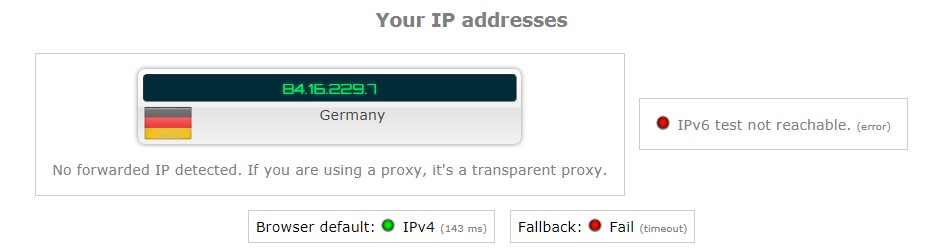
We have tested VPN Unlimited for IP leaks and the results are satisfying. No IP or DNS leaks were detected:
Platforms
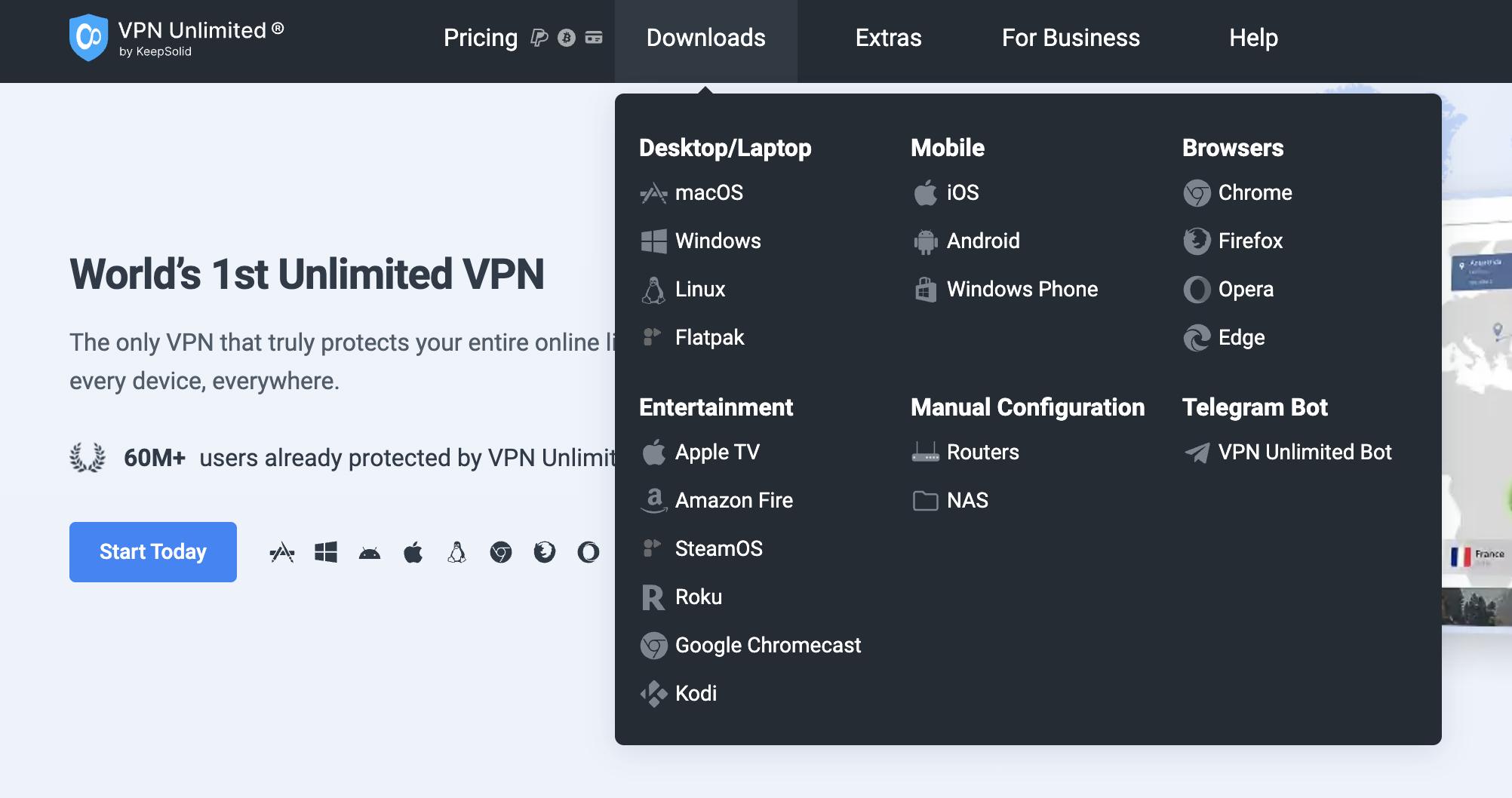
VPN Unlimited offers apps for Windows, macOS, Linux, Android, and iOS. KeepSolid also provides setup options for supported routers and smart TVs.
Browser extensions are available for Chrome, Firefox, Opera, and Microsoft Edge. Check the relevant download page for current system requirements and installation instructions.
Summary
KeepSolid VPN Unlimited offers broad platform support, unlimited bandwidth, and optional extras such as personal servers, dedicated IP addresses, and additional device slots. Its standard allowance covers 5 registered devices, with options to expand that limit. 30-day money-back guarantee provides a separate refund window for eligible purchases.
However, the standard device allowance, extra charges for optional features, and restrictions on P2P server selection are also worth considering.
VPN Unlimited pros
- Apps for Windows, macOS, Linux, Android, and iOS, plus browser extensions
- Unlimited bandwidth
- Personal static IP addresses and personal VPN servers available as paid add-ons
- 30-day money-back guarantee
VPN Unlimited cons
- Standard plan has a 5-device registration limit, additional slots cost extra
- Personal IP addresses and personal servers require separate purchases
- P2P traffic is restricted to designated servers
- Collects account and operational information, including device identifiers and app details