StrongVPN is designed to improve your online privacy by encrypting traffic between your device and a VPN server and masking your public IP address. It supports modern protocols such as WireGuard and offers apps for desktop and mobile devices, making it an option for everyday browsing, streaming, and connecting on public Wi-Fi. A VPN can also help you access websites affected by geographical or network restrictions.
In this review, we examine StrongVPN’s security features, privacy policy, overall reliability, and pricing to help you decide whether it meets your needs.
StrongVPN plans and prices
StrongVPN offers monthly and annual subscriptions. Both include access to its VPN server network, unlimited bandwidth, and up to 12 simultaneous connections, making StrongVPN a great VPN for multiple devices. Its apps are free to download, but using the VPN requires a paid subscription.
| StrongVPN plan | Advertised price | Billing details |
|---|---|---|
| Monthly plan | $11.99 per month | Billed monthly. |
| Annual plan | $3.97 per month | $47.69 for the first year, paid upfront. |
The annual offer reduces the initial cost by 66% compared with paying monthly. However, it is an introductory price, so check the renewal amount and billing terms at checkout.
Both memberships include:
- Access to the same VPN server network.
- Unlimited bandwidth with no provider-imposed speed limits.
- Support for modern VPN protocols, including WireGuard and OpenVPN.
- Up to 12 devices connected simultaneously.
StrongVPN does not offer a free VPN trial. Its 30-day money-back guarantee applies to annual subscriptions, not monthly plans. The separate StrongDNS service offers a seven-day trial; this should not be confused with a VPN trial.
StrongVPN server network
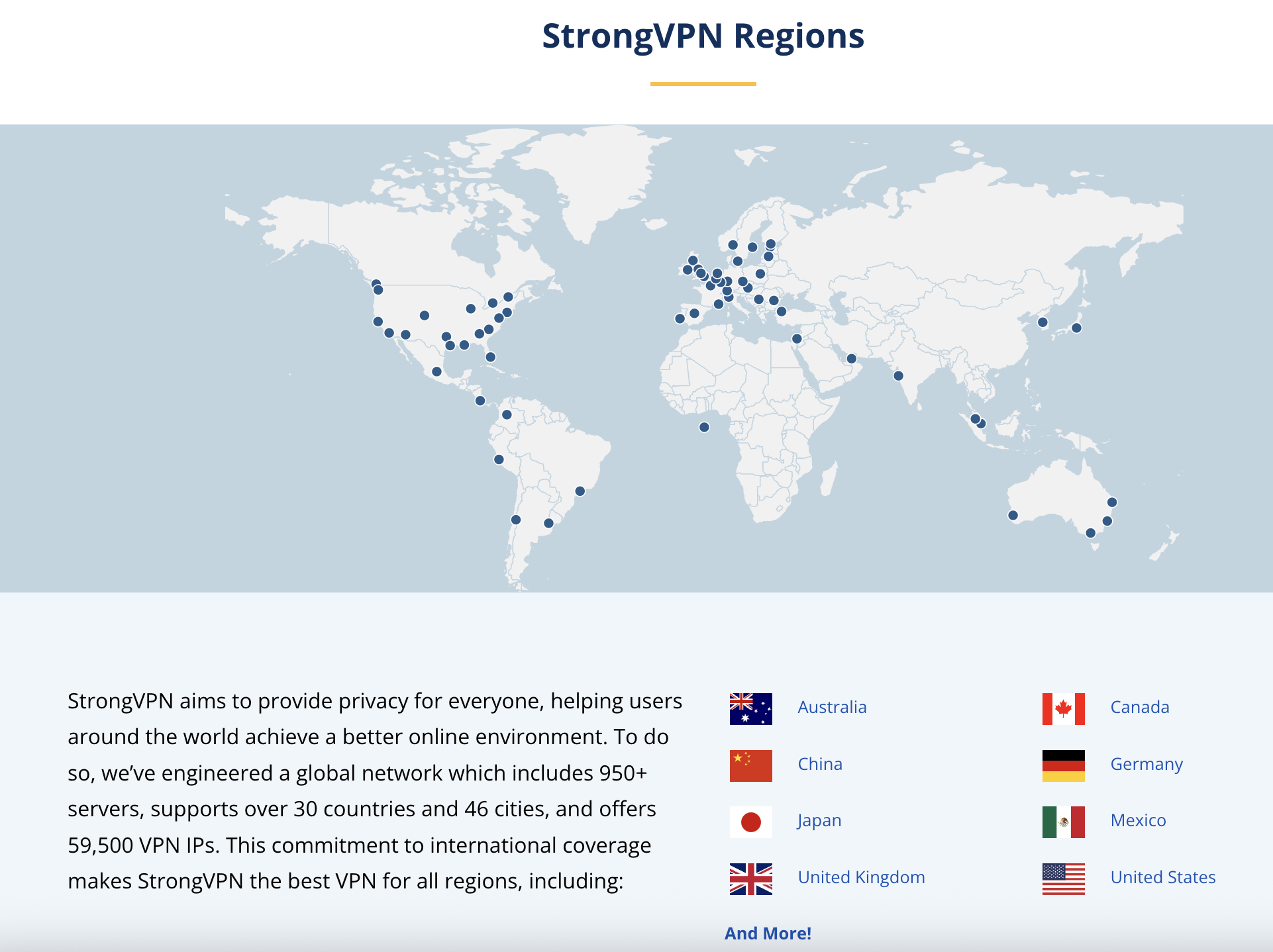
StrongVPN’s plans cover more than 950 servers in 30 countries and 59 cities. Connecting to a server changes the public IP address that websites see, making your connection appear to originate from the selected location. This helps with geographic restrictions. StrongVPN also provides troubleshooting guidance for streaming services that block VPN connections.
StrongVPN features
· Streaming and access to geo-restricted content
StrongVPN focuses on VPN service for streaming and accessing content while traveling. By connecting to one of its servers worldwide, you can access content and streaming platforms that are usually unavailable in your location or on your network.
· Secure access to the internet
StrongVPN encrypts traffic between your device and its VPN server, helping protect that connection from interception. Supported protocols include WireGuard, OpenVPN, IKEv2, and IPSec, although the available options depend on your device and app.
· Protection for multiple devices
StrongVPN’s subscription allows up to 12 simultaneous connections. StrongVPN offers dedicated apps for Windows, macOS, iOS, Android, and Amazon Fire TV, allowing you to use the service at home or while traveling.
· Unlimited bandwidth
StrongVPN does not impose bandwidth caps or speed limits on its subscriptions.
· Kill switch
StrongVPN provides a kill switch in its Windows and macOS apps. This feature can block internet traffic when the VPN disconnects, reducing the risk of traffic leaving your device outside the VPN connection. Availability depends on the platform and selected protocol. For example, StrongVPN’s macOS documentation specifies OpenVPN or L2TP for its kill switch.
Security and privacy
StrongVPN supports several VPN protocols, including WireGuard and OpenVPN. These are alternative connection methods, not layers of protection that all run simultaneously. Protocol availability varies across its apps and supported configurations.
StrongVPN states that it does not collect or log traffic passing through its VPN service. Its privacy policy also states that it does not track users’ browsing activity while they are connected.
Customer support
StrongVPN provides 24/7 customer support and an online help center with setup instructions, FAQs, and troubleshooting articles. You can also contact support for account or connection problems.
StrongVPN’s terms and privacy policy
Before subscribing, read StrongVPN’s terms of service and privacy policy. These explain the information the company collects, how it uses that information, and the conditions that apply to your subscription.
VPN activity and website data
StrongVPN states that it does not collect or log VPN traffic. However, its website collects basic visitor information, including visitor numbers and page views, and uses cookies for functions such as account authentication. Website data collection should be distinguished from VPN logging activity.
Account information
Creating an account and purchasing a subscription requires personal information. StrongVPN identifies account-related data, such as your name, email address, and billing information, as data it may collect.
How the company uses your information
StrongVPN states it uses account information to create accounts, collect payments, communicate with subscribers, and provide troubleshooting assistance. Its privacy policy also explains its use of cookies and other website-related processing.
StrongVPN is operated by Strong Technology, LLC. Review the current policy directly if jurisdiction, data handling, or legal requests are important considerations for your use of a VPN.
StrongVPN account setup
To become a StrongVPN customer, follow these quick steps:
- Visit the official website and choose a monthly or annual subscription.
- Create an account and complete payment.
- Download the appropriate app for your device.
- Install the app and sign in with your account credentials.
- Select a server location and connect.
The apps are free to download, but a paid account is required to use the VPN.
Supported platforms
StrongVPN provides dedicated apps for:
- Windows
- macOS
- iOS
- Android
- Amazon Fire TV
It also publishes setup instructions for Linux and selected routers, including WireGuard configurations. However, these may require manual setup rather than a dedicated StrongVPN app.
You can install StrongVPN’s software on multiple devices and connect up to 12 at the same time under one subscription.
Summary
StrongVPN offers monthly and annual plans, support for modern VPN protocols, unlimited bandwidth, and up to 12 simultaneous connections. Its annual introductory offer may provide better value than paying monthly, but check the renewal price before subscribing.
The service can help protect your internet connection and mask your public IP address, but it should not be described as providing complete anonymity, guaranteed access to every streaming service, or protection against every online threat.
StrongVPN pros
- WireGuard and OpenVPN support
- Up to 12 simultaneous connections
- Unlimited bandwidth and no provider-imposed speed limits
- Apps for major desktop, mobile, and Fire TV platforms
- No-logs policy
- 24/7 customer support
- 30-day money-back guarantee on annual plans
StrongVPN cons
- No free VPN trial
- Monthly subscriptions are excluded from the 30-day guarantee
- Kill-switch availability varies by platform and protocol